Download Text to Speech Software Panopreter 32-bit |
||||||||
|
||||||||
|
This software is clean, it has been scanned by multiple notable antivirus, here are the scan results from Jotti.org and VirusTotal.com. |
||||||||
Here are the steps to install the text to speech extensions for Chrome and Firefox web browsers. |
||||||||
|
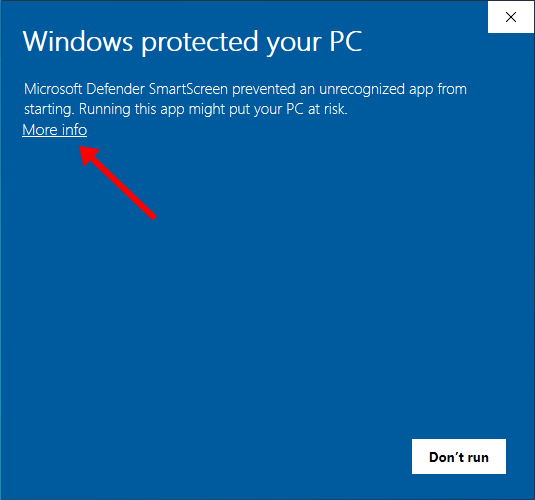
Smart App Control (SAC) is a new security feature starting with Windows 11 version 22H2, it may occasionally block legitimate software, including this software. Here is the method to turn off or on Smart App Control: Start menu > Settings > Privacy & security > Windows Security > App & browser control > Smart App Control settings Select On or Off. In the first few months of the new version release, when you try to download the software or start to run it, you may see the following warning from Microsoft Defender SmartScreen: Windows protected your PC. Microsoft Defender SmartScreen prevented an unrecognized app from starting. Running this app might put your PC at risk.
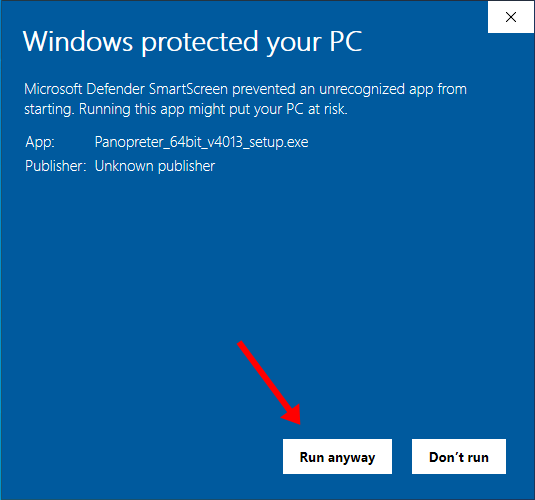
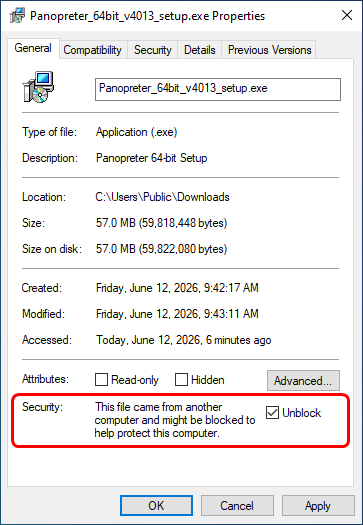
Microsoft Defender SmartScreen is a reputation-based tool that evaluates web sites, downloads and applications the first time you use them from the Internet. The new version of Panopreter doesn't have enough reputation with Microsoft SmartScreen yet. As more people download and install the newer version, it will establish reputation with SmartScreen, and no more warnings. So this is a false warning, you may run it safely, click the More info, and then click the Run anyway button. The option to run the installer anyway may not be available on corporate workstations or other systems where Windows local policy has disabled the ability to bypass this warning. In that case, you can continue by unblocking the file:
This should permit the installer to run without issue and begin the installation process.
Here are more references: |